
In logistics operations, the most frequently asked and hardest-to-answer question is: “Where is the vehicle right now?”
While this question seems simple, finding the answer through traditional methods is pure chaos. The operations manager calls the driver, the driver cannot pick up the phone or says, “I’ll be there in half an hour” without accounting for real-time traffic. Meanwhile, the customer waits impatiently on the line for a definitive answer. This chain of uncertainty leads to customer dissatisfaction and operational inefficiency.
For years, “Vehicle Tracking Systems” were sold to logistics companies to solve this. However, these systems came with a heavy bill: expensive “black box” devices, separate installation fees for every vehicle, the necessity of visiting a service center when a device malfunctioned, and never-ending contracts.
The Loggerise Live Fleet Tracking Module breaks this old cycle. We offer a next-generation solution that eliminates hardware costs, requires no installation, and brings technology directly to the smartphone in the driver’s pocket.
In this comprehensive guide, we will explore how device-free vehicle tracking works, how to illuminate operational blind spots, and how to manage your fleet with the precision of a “Control Tower.”
1. The Hardware Era is Over, the Software Era Has Begun
In traditional vehicle tracking systems, you must buy or lease a GPS device for every vehicle. For a fleet of 50 vehicles, this means an initial investment of thousands of dollars. Moreover, you have to pull your vehicles from the field for installation, which means “downtime.”
Loggerise removes these barriers with its “Device-free” technology.
How Does It Work?
Our system utilizes the GPS sensors already built into the smartphones your drivers use every day.
The driver downloads the Loggerise Driver Mobile App.
They log into the application.
Tracking starts automatically when you assign a trip from the center or when the driver clicks “Start Shift.”
It’s that simple. No cables, no installation, no device costs. Even when a new rental (spot) vehicle is added to your fleet, you can start tracking it immediately as soon as the driver downloads the app. This flexibility is revolutionary, especially for logistics companies working with third-party suppliers.
2. Operational Control Tower: The Live Map
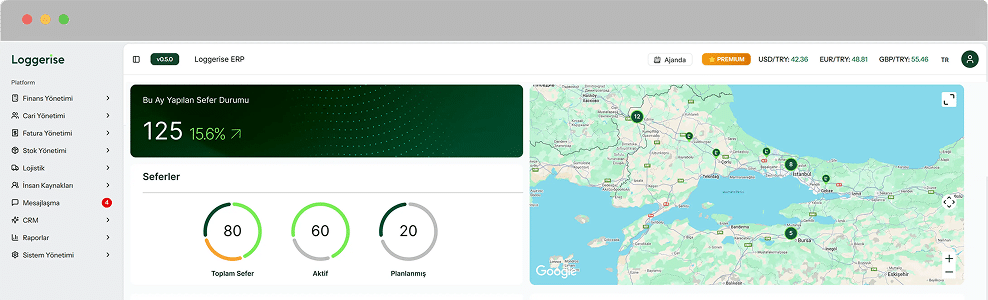
For logistics managers, fragmented data is a nightmare. Vehicle plates in an Excel list, locations on WhatsApp, load info in emails… Loggerise consolidates all this scattered data onto a single screen: the Live Operation Map.
Whether you have 5 trucks or 500, you get a bird’s-eye view of the entire operational field.
What Do You See on the Map?
Real-Time Location: The exact position of the vehicle.
Direction of Movement: Where the vehicle is headed.
Instant Speed: The driver’s current velocity.
Traffic Density: Real-time traffic conditions via Google Maps integration.
This data matches the vehicle cards in the Vehicle and Fleet Management module. When you click a pin on the map, you see not just a location, but the license plate, the driver, and the specific cargo being carried.
3. Smart Status Management: Not Just “Where,” but “In What Condition?”
Knowing a vehicle is at the city gates isn’t enough. Is it loaded? Empty? Has it broken down or is the driver taking a break? Loggerise provides operational insight by classifying vehicles on the map with color codes and statuses.
🟢 Active / In Transit (Green): The vehicle is loaded and moving toward the destination defined in the Trip Management module. Everything is on track.
🔴 Passive / Parked (Red): The ignition is off. The driver is resting or on an overnight stay.
🟡 Available / Empty (Yellow): The vehicle has unloaded and is ready for a new job. This status is critical for planning backhaul (return) loads.
⚪ Service / Maintenance (Grey): The vehicle is currently out of operation or at the workshop.
With these color codes, a 3-second glance at the map is enough to analyze the overall health of your operations.
4. Rapid Action and Operational Agility
Logistics is a game of speed where seconds affect profitability. The faster you respond to an urgent load request from a customer, the higher your chances of winning the job.
Scenario: “Urgent Load Alert!”
Old Method: Customer calls with an urgent shipment. You open your Excel list and start calling drivers in that area one by one. “Where are you?”, “Are you empty?”, “When will you be free?” This process takes 30 minutes.
Loggerise Method:
Open the Live Map.
Zoom into the relevant region.
Filter for “🟡 Available” vehicles only.
You see an empty vehicle just 10 km away.
Instantly send the new work order to the driver via the app.
Time taken: 2 Minutes.
This agility results in higher customer satisfaction, extra revenue, and a crushing advantage over competitors.
5. Customer Transparency and the “Tracking Link”
While customers today can track a pizza on a map, they find it unacceptable not to know where their multi-million dollar cargo is. Calling your representatives to ask “Where is the truck?” wastes your team’s time.
With Loggerise, you can send your customers a “Temporary Tracking Link”:
The customer clicks the link.
They see only the vehicle carrying their specific load on the map.
They monitor the Estimated Time of Arrival (ETA).
The link expires automatically once the delivery is completed.
6. Speed Violations and Safety Monitoring
Driver safety and cargo security are paramount. Additionally, exceeding speed limits increases fuel consumption and the risk of fines.
Instant Speed Indicator: Monitor driver speeds in real-time on the map.
Safe Driving: Identify and warn speeding drivers and use the data for performance scoring in the Driver Management module.
7. Third-Party (Spot) Vehicle Management
During peak seasons, logistics firms use rental (spot) vehicles when their own fleet is insufficient. It is impossible to install GPS devices in these temporary vehicles, making them a “blind spot.”
Loggerise’s device-free structure solves this:
Create a “Temporary Driver” account for the spot driver.
The driver downloads the app.
You track the load until delivery is complete.
Access is revoked after delivery.
This ensures you maintain the same tracking standards for rented vehicles as you do for your own fleet.
Conclusion: Illuminate the Blind Spots
You cannot manage what you cannot see. The Loggerise Live Fleet Tracking Module lifts the fog over your operational field, giving you clarity, speed, and control.
Digitalizing your fleet without drowning in hardware costs or long-term contracts is now easy.
Save Money: No device or installation costs.
Be Faster: Seize opportunities with instant decisions.
Satisfy Customers: Provide transparent information.
Carry technology in your pocket. To see the system in action or to request a free demo, contact us via our Contact page.